

Turnitin is a web application for checking plagiarism in academic work, available to Mahidol University students, lecturers and staff.
For students
Register for a class provided by the Central Library to check your own research work for similarity
For lecturers and staff
Register for a class provided by the Central Library, or request an Instructor account for teaching at Mahidol University
Introduction to Turnitin
Turnitin is a web application used as an anti-plagiarism tool to check academic work for copying and similarity. It can check journal articles, theses, reports, research proposals and other types of academic writing, and supports English and more than 40 other languages, such as Spanish, Chinese (Simplified and Traditional), Japanese and Arabic. (1)
Works written in Thai can also be checked, but language-processing (coding) limitations may make the similarity score higher than it actually is.
Turnitin has 3 modules: (2)
1. Similarity Check
Finds similarity between academic work and 3 types of sources: websites, electronic databases, and institutional files stored in Turnitin. Results appear as a "Similarity Report" showing the Similarity Percentage.
2. Feedback
Lets instructors give feedback on submitted work using QuickMarks and summary comments.
3. Grading
Lets instructors grade written work using rubrics.
Mahidol University users can access Turnitin at www.Turnitin.comturnitin.com
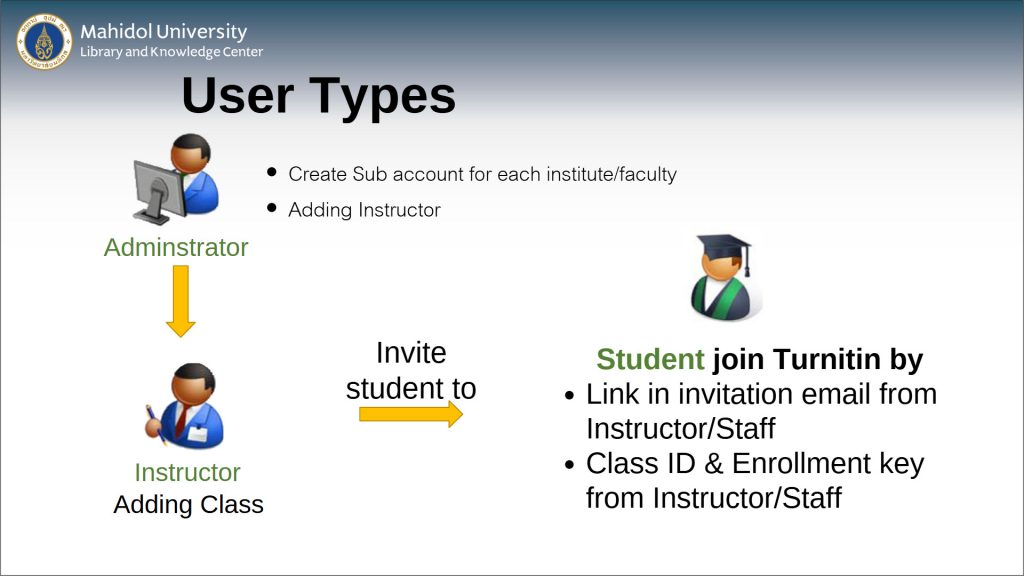
Turnitin User Types
Turnitin classifies users by their access rights as follows:
Turnitin Administrator
Adds Instructor accounts under each faculty's Account ID, and oversees the use of Turnitin in line with the university's agreements and regulations.
Instructor
Can create classes and assignments, and add student accounts so that students can submit work to those classes. Instructors can also check their own work with Quick Submit.
Instructor accounts are available to Mahidol University lecturers and staff only.
Student
Can submit work only to the classes they are enrolled in.
Requesting Access to Turnitin
- Instructors: register at https://portal.li.mahidol.ac.th/forms/turnitin, stating your status as a lecturer and the courses you teach.
- Students: register at https://portal.li.mahidol.ac.th/forms/turnitin to submit work to a Central Library class, or enroll in your instructor's class for a course you are currently taking.
User Guides
Guides for Instructors
These step-by-step guides are available in Thai only.
Guides for Students
Contact
Ms. Ratikorn Varavudhi / Mr.Suppasit Thongsuk
Central Library, Mahidol University Library and Knowledge Center
Tel. 0-2800-2680-9 ext. 4300 / 4301 during official working days and hours, or e-mail liturnitin@mahidol.ac.th
We will reply by e-mail once we receive your information.
References (2)
- (1)Turnitin.com. How Turnitin supports languages to ensure integrity in a global marketplace of ideas. Retrieved from www.turnitin.com/blog/how-turnitin-supports-languages-to-ensure-integrity-in-a-global-marketplace-of-ideas.
- (2)Turnitin.com. Understanding the Next Generation of Turnitin Feedback Studio Retrieved from https://go.turnitin.com/UnderstandingNextGenTFS_EducatorGuide